
Leganto March 2025 Release Notes
April 2025 Sneak Preview
-
Create resource list from a syllabus using AI (Beta)
Main Features
Restore Deleted Citations from Recycle Bin
March 2025 Leganto  CERV Enhancement (ID #9049) URM-227485
Leganto now includes a recycle bin for instructors and library staff to restore deleted items. The recycle bin is available for items deleted manually from Leganto or Alma, items deleted in bulk in Leganto, and items deleted when a section is deleted in Leganto.
The recycle bin is only visible when it contains items.
If a list is deleted the items are not added to the recycle bin. If an item is deleted by an Alma job, it is not added to the recycle bin.
The recycle bin is available at the list level in Leganto, and contains only items deleted from that list. A counter indicates how many items the recycle bin contains. When enabled, users receive a notification informing them that an item was deleted.
Items in the recycle bin are considered deleted; therefore, these items are not included when searching or filtering citations.
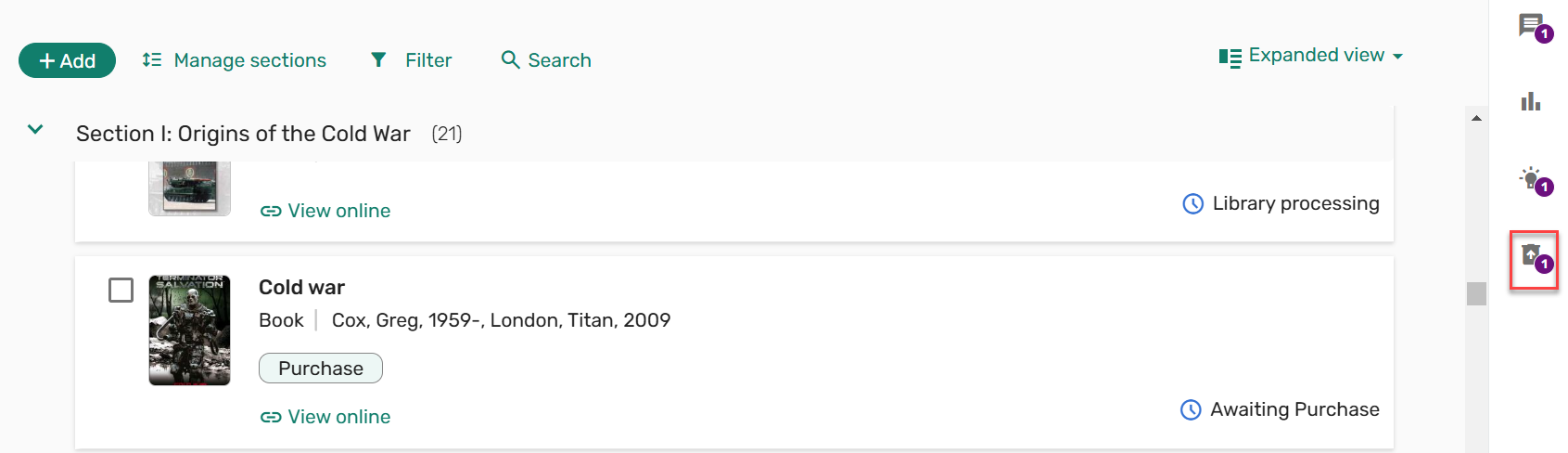
Deleted items remain in the recycle bin for up to 30 days. Librarians, instructors, list owners, and Leganto course operators can view the recycle bin and restore deleted items.
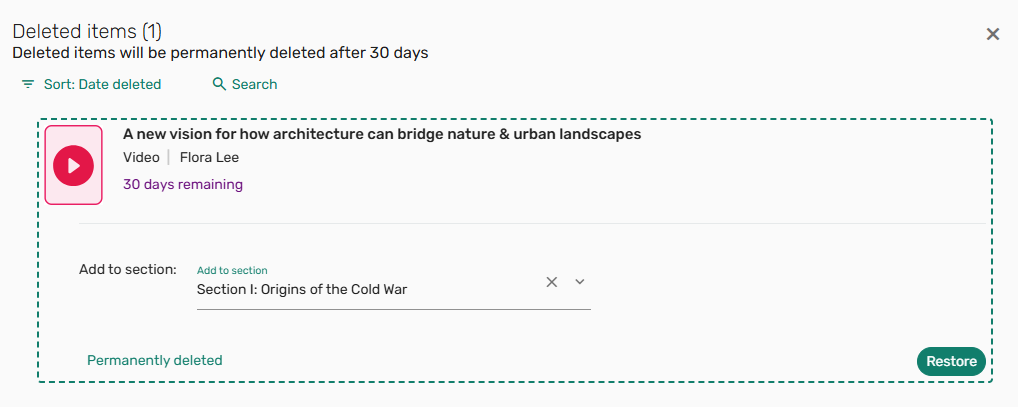
If the item is added back to the list, the Date modified for restored items is the date the item was restored.
When restoring a deleted item with an In process copyright status, the copyright record is not restored. When restoring a deleted item with an Approved copyright status, the copyright end date is updated to the deleted date. Restoring deleted items with a DCS copyright or a Bolk clearance are managed similarly to when an item is deleted.
All other information about the citation, including tags, notes for students, due dates, and usage, are preserved.
Currently, Leganto analytics reports contain deleted items and the List analysis in Leganto contains deleted items. The ability to filter deleted items in analytics will be available in a future release, and the List analysis in Leganto will exclude deleted items.
Choose Which Citation Tags to Copy on Rollover in Leganto (CERV Part 2)
March 2025 Leganto
CERV Enhancement (ID #7180)
It is now possible to configure which tags are copied to the new list when duplicating a list in Leganto. When duplicating a list, citation tags are copied to the duplicated list based on the Instructor-Library tags,Library-Internal tags, and Public tags(Configuration > Leganto > List Management > Instructor Rollover Operations) configurations. The tag configuration options are all(copy), blank (reset), or multiple code values separated by a comma. If the Instructor-Library tags,Library-Internal tags, or Public tags are configured with tag codes, only the configured tags are copied to the duplicated list.
If you select that only some of a certain tag type are copied, we recommend disabling that tag type from the instructor-facing display. Instructors may not understand why they selected to copy tags, and only some were selected. Alternatively, you could change the label to indicate which tags are copied.
For more information, see Duplicating a List.
Link or Relink Citation to Library Resource in Leganto UI (Manual Locate in Leganto)
March 2025 Leganto URM-237310
Leganto now provides a way for library staff to link a citation to a specific record in the library collection. To enable library staff to link a citation to a library record, the Manage link to library action is now available when logged into Leganto as a library staff member. When selecting Manage link to library, the search window opens. The search performed is according to the original item's title and author. The user can change the search as needed. When hovering over an item from the search results, the Link action and More details button are displayed. Library staff can link or re-link the original citation to the library record. The citation metadata is updated depending on the on_locate(Configuration > Fulfillment > General > Other Settings) configuration, and the citation inventory presents the availability of the selected record.
The Manage link tolibrary action is not displayed when a list is locked.
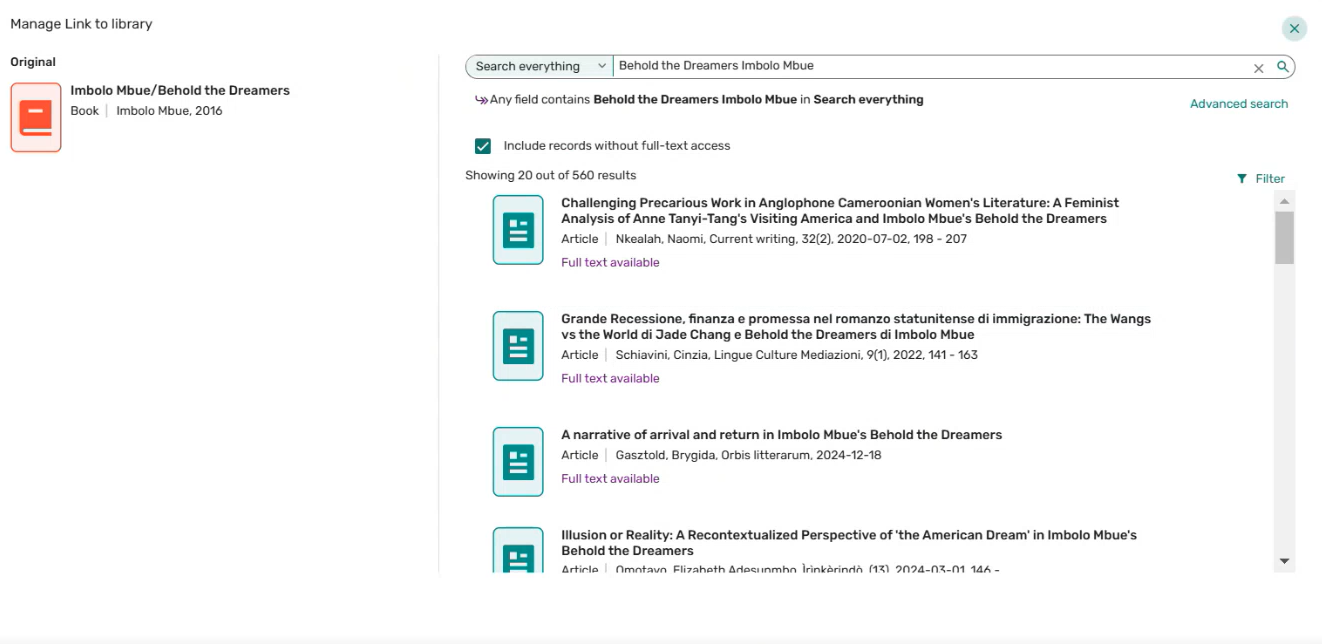
When the citation is updated, any usage, tags, notes, and copyrights are maintained.
The Manage link to library action is not available when accessing Leganto from a mobile phone, as a student, or from the view as student option.
Cite it! Browser Extension
March 2025 Leganto URM-232272 SF: 0267181 07268690 07269144 07270248 07270715 07273123 07273316 07486451 07487507 07491879 07496801 07500034 07609705 07634186 07683226 07684346 07687836 07717352 07725694 07730659 07730700 07757891 07766207 07771444
Cite it! is now available as a Chrome browser extension. You can install it from the link within User settings > Cite it!, or by searching for Leganto Cite it! Bookmarking Tool on the Chrome Extensions Web Store, or from https://chromewebstore.google.com/.
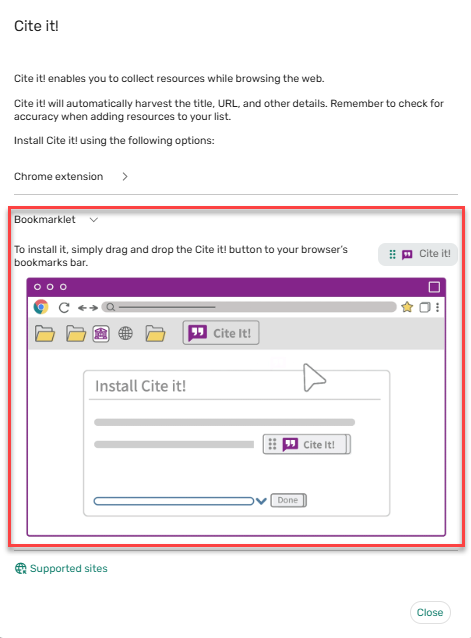
The Cite it! screen in Leganto was updated to include both the Chrome extension and the Bookmarklet.
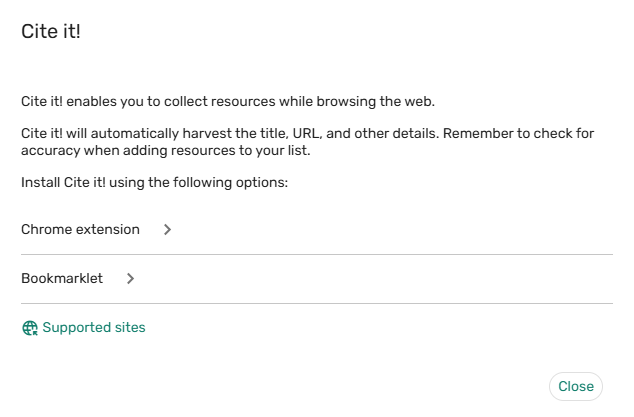
Selecting the Chrome extension opens a link to the Chrome extensions web store and an option to copy the institution info, as well as installation instructions.
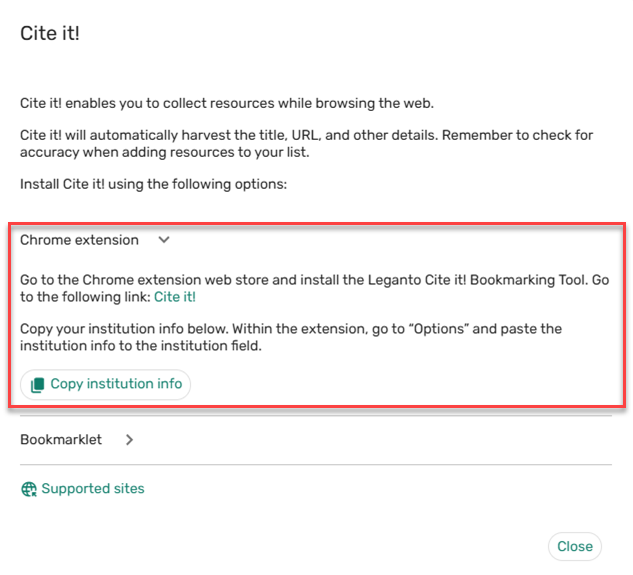
After adding Cite it! as a browser extension, right-click the Cite it! extension icon , and select Options. Enter the Leganto URL in the Institution field and select Save. A confirmation is displayed indicating that the settings are saved. Once you are logged in to Leganto (if you are not already logged in, you are prompted to do so), when selecting the Cite it! extension icon, the Cite it! form is displayed with reference's metadata.
The option to install the bookmarklet is now available in a dedicated section on the Cite it! window.
Additional Enhancements
-
March 2025 Leganto URM-237651 The Sample list is now represented by a new icon. The previous icon is now commonly used to indicate AI.

-
March 2025 Analytics URM-237085 The following fields now display the tag labels instead of the tag codes to better indicate the values of the fields:
- Citation Public Tags
- Citations Instructor Library Tags
- Citation library External Tags
- Citation library Internal Tags
The Citations Instructor Library Tags field was renamed from Citations Library Tags.These fields are located in the Citations folder of the following subject areas:
- Leganto Student Usage
- Course Reserves
- Leganto Instructor Usage Events
- Purchase Requests
-
March 2025 Analytics URM-236250 The Processing Department Code field was added to the Courses dimension in the following subject areas:
- Course Reserves
- Leganto Student Usage
- Leganto Instructor Usage Events
- Requests
This field displays the processing department code, which may be easier to report on that the processing department name.
Resolved Issues
| SF number | Description |
|---|---|
| 07880309 URM-241667 | Previously, when manually adding an item with a URL to Favorites, the URL was not saved. This was fixed. |
| 07718713 URM-241216 | In some cases, citations coming from CDI Israeli collections did not have the brief availability status citation available when they should have. This was fixed. |
| 07871125 URM-241645 | Previously, after running the Reading List Bulk Update with a Draft reading list publication status, the instructor received notifications that unpublished lists were published. This was fixed. |
| 07053158, 07120278, 07259986 URM-219336 | Previously, when force_login (Configuration > Leganto > General > Settings) was set to true, shareable links to a predefined Find Lists search opened My Lists instead of displaying the predefined search results. This was fixed. |
| 07874739 URM-241133 | Previously, selecting View Online from the brief view did not open the first link when force_direct_uresolver (Configuration > Leganto > Features > Leganto Features) was set to true and the first link was set first. This was fixed. |
| 07777193 URM-240008 | Previously, citations were partially hidden behind the left panel with some screen resolutions. This was fixed. |
| 07850484 URM-239946 | Previously, the mobile view did not display the complete citation metadata. This was fixed. |
| 07718722, 07823845, 07850615 URM-239283 | Previously, when a citation was available at another institution, the institution code was displayed rather than the institution name. This was fixed. |
| 07843892 URM-239253 | Previously, when searching Summon, no physical results were returned. This was fixed. |
| 07742258, 07797902 URM-238716 | Searching for a list by Start/End date did not return the expected results. This was fixed. |
| 07801091 URM-238630 | Previously, references from the EndNote trash folder were imported together with the other EndNote Library references into Leganto. This was fixed. |
| 07805936, 07810198 URM-238022 | Previously, when searching classic Primo from the Leganto New UI, filtering the results was not supported. This was fixed. |
| 07807877 URM-237834 | Previously, when creating a new section using the Add button, it was possible to create multiple sections at once. This was fixed. |
| 07745547, 07771871 URM-237701 | Previously, when the parameter auto_send_list_updates (Configuration > Leganto > List Management > Settings) was set to true, items added after the list was published received a Draft status. This was fixed. |
| 07765985 URM-237671 | Previously, when adding a digitized extract and then adding the material type Book, the URL field was incorrectly marked as mandatory. This was fixed. |
| 07254767 URM-237614 | Previously, when adding tags to an item, the tooltip for the tags included HTML tags. This was fixed. |
| 07777519 URM-237604 | Previously, sorting a citation by Author did not work for book chapters. This was fixed. |
| 07766057 URM-237537 | In some cases, the physical availability was displayed in the brief view when it should have been hidden. This was fixed. |
| 07765876 URM-237494 | In some cases, the User settings > Library view only settings were not applied. This was fixed. |
| 07726438 URM-236204 | Previously, when editing an item, the changes were not visible until the list was refreshed. This was fixed. |
| 07161269 URM-236188 | Previously, the Clear and Apply buttons were not visible from the mobile filter view. This was fixed. |
| 07741007 URM-236080 | Previously, when duplicating a list, upon selecting a list from the dropdown list, a different list could not be selected. This was fixed. |
| 07765331, 07775066, 07785755, 07852546 URM-235542 | When the Leganto UI was configured for a language other than English, some of the information on the Links & Availability tab was displayed in English. This was fixed. |
| 07713526 URM-234690 | In some cases, when the general_message parameter (Configuration > Leganto > General > Customer Labels) was configured, the General message was not displayed for all users. This was fixed. |
| 07688107, 07767662, 07845728, 07864013 URM-232648 | Previously, the broken link alert was displaying the article name. This was fixed. |
| 07860828 URM-221921 | Previously, fonts were called directly from Google. Now, fonts are stored locally and retrieved from the Ex Libris servers. |
| 07696332 URM-236151 | Previously, when a citation with an external link was added to a completed list, the list status set in list_new_citation_in_completed_list (Configuration > Leganto > List Management > Course Reserves Automatic Statuses) did not update. This was fixed. |
